Slackware64-Current (15.0): mini-ITX Benchmarks Part 2
Posted on Dec 31, 2019 by kingbeowulf
To close out the old and ring in the New Year, I've added my EVGA GTX 1060 6GB GPU to the benchmark comparison. Both the GTX 1060 and GTX 950 are short, single fan ITX form factor cards that will fit the mini-ITX case. We'll have to wait for CES 2020 to see what GPUs AMD announces, and what form factors manufacturers push out. Rumor has it the the second generation Navi will be twice as fast as the current Radeon 5700 XT series. I noticed that the XFX RX590 is a dual BIOS card with a switch - the "perf" run is with that switch set for a more aggressive fan curve (1660+ rpm at idle) vs. quite mode (880 rpm). It didn't provide a significant performance increase but did keep the GPU about 10C cooler. All runs were with VSYNC off but all other settings (driver and phoronix) at default values.
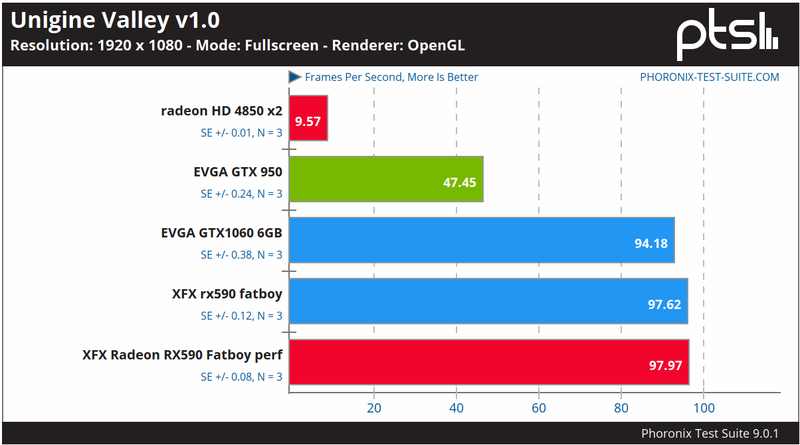
The RX590 ekes out a few more fps over the GTX1060, but generally the performance is nearly equivalent.
1EVGA GTX 590 Nvidia 440.36 kernel 5.4.2
2EVGA GTX 1060 Nvidia 440.44 kernel 5.4.6
3Radeon HD 4820x2 kernel 5.4.3 Mesa 19.3.0 radeon (modesetting) 1.20.6
4XFX Radeon RX590 Fatboy kernel 5.4.5 Mesa 19.3.1 AMDGPU 19.1.0
5XFX Radeon RX590 Fatboy Perf kernel 5.4.6 Mesa 19.3.1 AMDGPU 19.1.0
Slackware64-Current (15.0): mini-ITX Benchmarks Part 1
Posted on Dec 22, 2019 by kingbeowulf
Here are some initial Phoronix-test-suite benchmarks for the miniITX Rysen 7 with various GPUs I had on hand. For Nvidia, we used the their proprietary driver; for AMD, the open source radeon and amdgpu drivers provided in Slackware64-current kernel 5.4.2, 5.4.3, 5.4.5 (nvidia, radeon, amdgpu, resprctively - Slackware updates were fast and furious this week!).
The CPU cooler is a low profile SilverStone SST-KR01 so that the power supply would fit. Power is provided via a Rosewill HIVE 650S 650W ATX power supply. The Nvidia EVGA GTX 950 is an ITX form factor GPU; and thus, the results are with the case closed. The 2 radeon GPUs are huge and are attached via a PCI-E riser with the case open.
Phoronix Test Suite from Slackbuilds.org; stock KDE4; system and tests use default settings. For the RX590, the "HIGH" run references setting the GPU power management to "high" from the default of "auto".
1EVGA GTX 590 Nvidia 440.36
2Radeon HD 4820x2 Mesa 19.3.0 radeon (modesetting) 1.20.6
3XFX Radeon RX590 Fatboy Mesa 19.3.1 amdgpu 19.1.0
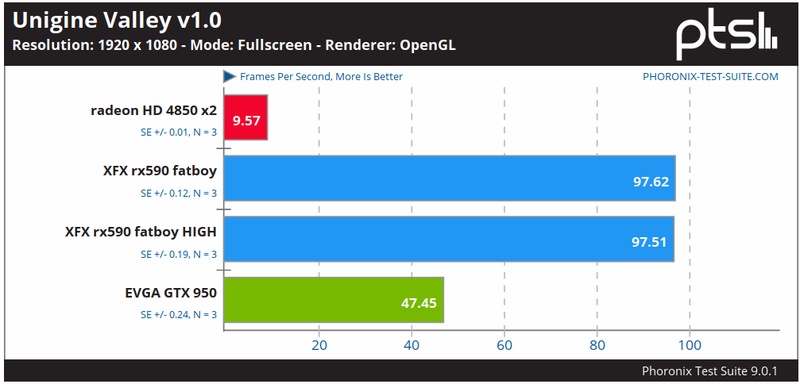
So far am quite pleased and can't wait to get my hands on a Vega or NAVI series GPU, and of course Slackware 15.0 "real soon now."
New Slackware64-Current (15.0) test build: AMD Ryzen 7 3800X and mini-ITX
Posted on Dec 15, 2019 by kingbeowulf
It was a shame to toss a perfectly good mini-ITX case (Coolermaster Elite 110), so with the assistance of a mysterious benefactor, and fellow Slackware fan, I now have the components:
1GIGABYTE X570 I AORUS PRO WIFI Mini-ITX Motherboard
2AMD RYZEN 7 3800X CPU
3Patriot Viper Steel 16GB DDR4 4400 (PC4 35200)
It will be interesting to see what does and doesn't work OOTB for kernel 4.19.xx and 5.4.xx. Now I just need a good sale for some AMD Navi GPUs. I have an assortment of older AMD and Nvidia to try out in the meantime.
Stay tuned!
The HP d530 Pentuim 4 is dead; Long live the Lenovo M91p i5-2400s
Posted on Sep 30, 2019 by kingbeowulf
It was only a matter of time, I suppose, but my old Pentium 4 box used as a hobby server is no more. A fast thunderstorm with hail moved through our area. Of course, we lost power for several hours. Rather than hope the UPS will last long enough, I powered the ol' box down. Unfortunately, the P4 had issues powering up and booting. When it did boot, it was missing some memory and a had number of other motherboard glitches. I was planning on moving everything to the M91p with the release of Slackware64-15.0, anyway.
It is time.
Welcome our "new" server!
[UPDATE: Now running on a Slackware Linode with Wagtail CMS. -KB Jan 2, 2021]
The Witcher 2: Assassins Of Kings Enhanced edition on Slackware64
Posted on Sep 15, 2019 by kingbeowulf
I purchased this game on sale at GOG.com a while back (2014?) when I was exited about the Linux port, and before I realized it used the wrapper eON translation layer. (We can quibble over wrapper vs API vs etc here: PSA: eON is not a wrapper).
I'll just say that native linux code would be better.
Performance with Slackware64 multilib with Nvidia GTX 660 was poor: crashes, video glitches, lags, sudden fps drops. I was barely able to complete the tutorial section. A few patches were released that improved performance. There was also github project that tracked Linux updates and performance tweaks which now seems to be gone. I put the game aside for awhile to let it mature.
GOG.com updated Witcher 2 to Release 3, and it is officially tested on Ubuntu 16.04 LTS, Ubuntu 18.04 LTS, and variants. Non-Ubuntu Linux distributions are not officially supported - as in no technical support or refund. As a Slackware user, I have found that par for the course. Here are some notes on giving Witcher 2 another go.
1Slackware64-14.2 Multilib, kernel 4.4.190
2EVGA Nvidia GTX 1060 6GB driver 430.50
3Samsung U28590 4K monitor
4Xfce 4.12
5Additional dependencies (compat32 versions) from Slackbuilds.org:
6    SDL2 2.0.3 or later.
7    SDL2_image 2.0.0 or later.
8    Release notes state SDL_image; this is an error
Witcher 2 is a 32-bit program, so multilib and compat32 libraries are not needed on the Slackware 32-bit release.
The installer script runs perfectly to install the game and create desktop and menu entries. Running from the desktop brought up the launcher. However, the play or option menu opens with an error. Running via the terminal, shows a surprise for non-systemd linux distributions: a dependency on libsystemd.so.0. Another Slackware user posted the fix on the GOG.com forum:
LINUX Witcher 2 non-debian distro compatibility bug AND solution
Simply delete or rename /game/libdbus-1.so.3.14.6 and the libdbus-1.so.3 symlink, and the game will use Slackware's libdbus-1.so.3.14.6. Now the game will work as intended.
Witcher 2 runs much smoother at even 4K resolution. Battles with large groups are now possible. I'll probably eventually play on a 1080p monitor to further smooth out the frame rate and reduce the tearing in cut scenes. There are some optimizations and tweaking to do, but I will leave that as an exercise for the reader.
- Related Topics:
- eON
- gog.com
- games
- slackware64
- witcher 2
Slackware64-current and NetworkManager
Posted on Jun 17, 2019 by kingbeowulf
On the Lenovo T510 laptop I use to track and test Slackware-current, everything I've played with has been good so far. About a week ago, after another kernel update (4.19.48 and .49), the wifi kept dropping off when using Network Manager via the KDE network applet in the systray. Wired connectivity was fine. I at first though the Netgear R7000 router was gimpy since I had just updated it's firmware as well. The laptop would drop the connection after a few hours, and DHCP would take several minutes, if it connected at all. Usually, '/etc/rc.d/rc.networkmanager restart' (or stop, start) would fix the issue for a while. However, other devices (phones, tablets, Slackware-14.2...) remained connected with no issues. Using the command line nmcli and nmtui worked with no connectivity issues for several days. There has been another kernel update, and I haven't tried Xfce yet.
UPDATE: Looks like the updates from last week (kernel 4.19.51 now) seemed to fix this odd Network manager applet glitch.
- Related Topics:
- slackware
- dhcp
- network
- network manager
Slackware and SlackBuilds.org (SBo) cited in a scientific publication
Posted on Mar 16, 2019 by kingbeowulf
Announced on the SBo mailing list and his blog, a long-time Slackware user and SBo buildscript maintainer, has cited both Slackware and SBo in a recent publication from his research group. Read more in his blog and paper below.
1Software and data
2All bioinformatics software used for this work was installed on a Slackware (https://www.slackware.com/) GNU/Linux system,
3almost exclusively from the scripts available at the SlackBuilds.org project (https://slackbuilds.org/)...
Slackware and SlackBuilds.org cited in a scientific publication
Computational analysis of the evolutionarily conserved Missing In Metastasis/Metastasis Suppressor 1 gene predicts novel interactions, regulatory regions and transcriptional control
- Related Topics:
- SlackBuilds
- slackware
- SBo
- bioinformatics
- science
Nvidia Driver Updates (* Security Fixes *)!
Posted on Mar 04, 2019 by kingbeowulf
Nvidia released a security bulletin and driver updates fix 8 security issues. One, CVE-2018-6260, can impact Linux users:
1NVIDIA graphics driver contains a vulnerability that may allow access to application data processed on the GPU through a side channel exposed by the GPU performance counters. Local user access is required. This vulnerability is not a network or remote attack vector.
The updated drivers are already in Slackbuilds.org. For non-Slackware Linux systems, please check your respective update repositories. Also, note that older Nvidia GPUs designated as EOL may not have their legacy drivers updated. For information on mitigating CVE-2018-6260, refer to the driver Known Issues section of the README.
Nvidia Linux Driver Known Issues
References:
GeForce Driver Updates Contain Security Fixes
Security Bulletin: NVIDIA GPU Display Driver - February 2019
Very Basic Qemu Bridge Networking in Slackware
Posted on Feb 10, 2019 by kingbeowulf
This is a very simple bridge example to allow your qemu quest to access your host's LAN and internet, as opposed to being isolated to access only the internet via NAT (the default), for a Slackware64 14.2 host and a Windows 10 guest. Note: in this case you will need to install the Windows 10 virtio drivers, otherwise you can just use one of the standard emulated qemu NICs. Create the ACL file to allow user access to the bridge. As root create '/etc/qemu/bridge.conf' with the lines:
1allow all
2allow br0
Then set permissions:
1# chown root:users bridge.conf
2# chmod 0640 bridge.conf
3# chmod u+s /usr/libexec/qemu-bridge-helper
This last setuid is needed if you didn't already do so when you built qemu. Now you can run qemu and access the br0 interface as an unprivileged user. This is the default if you installed qemu via Slackbuilds.org. Next, configure '/etc/rc.d/rc.inet1.conf' to set up the bridge interface at each boot:
 1...
 2# Example of how to configure a bridge:
 3...
 4IFNAME[0]="br0"
 5BRNICS[0]="eth0"
 6IPADDR[0]="192.168.1.6"
 7NETMASK[0]="255.255.255.0"
 8USE_DHCP[0]=""
 9DHCP_HOSTNAME[0]=""
10...
Now, run the network script to set it all up:
1# /etc/rc.d/rc.inet1 restart
The bridge should now be set up and linked to the host eth0 interface.
1# brctl show br0
2bridge name bridge id STP enabled interfaces
3br0 8000.d8cb8a384d54 no eth0
Logout of root, and as your local user you can now run the qemu VM. For example (legacy):
1$ qemu-system-x86_64 ... -net bridge,br=br0 -net nic,model=virtio-net-pci
Alternatively (modern), use
1$ qemu-system-x86_64 ... -netdev bridge,id=hn0 -device virtio-net-pci,netdev=hn0,id=nic1
R.I.P Linux Counter Project
Posted on Dec 15, 2018 by kingbeowulf
The Linux Counter project shut down a few days ago. It had a good run. I'm sad to see it end, and also that it never quite developed the popularity to fully serve its purpose. Commercial / proprietary software installed base is easy to count: sales. With F/OSS it is difficult to get a true count of the number of systems running Linux distributions. Raw downloads aren't a reliable count for systems actually in use.
Wikipedia: Linux Counter
Older posts
Contact:
- kingbeowulf@linuxgalaxy.org
- mumble.linuxgalaxy.org:64738
- Libera.chat IRC
- ##slackware, #slackbuilds, #linuxgalaxy
Screamin' and a-streamin' !
- https://twitch.tv/kngbwlf
- https://www.youtube.com/@mylinuxgalaxy
Advertisement
Tired of Steam, Epic and other rip-off game "stores"? Check out Humble Bundle for your digital download needs! A portion of your hard-earned gaming cash goes to charity.
King Beowulf's Humble Bundle Referral CodeCitizen Science!

