Slackware 15.0 AMD RX 6000 series (NAVI 23) power and fan issues
Posted on Jun 18, 2023 by kingbeowulf
After a recent purchase a few months ago of a MSI Mech Radeon RX 6650 XT ($280 US, newegg.com, now $250), I noticed a peculiar behavior whenever the monitor powered down: The admgpu/drm crashed. The system had to be shutdown and power cycled to restore GPU function. Same issue on both motherboards:
Gigabyte X570 AORUS ELITE AMD Ryzen 9 3900X
Kernel 5.15.94 Mesa-22.2.5 libdrm-2.4.115
Gigabyte 27-in 2560x1440 170 Hz IPS
Gigabyte X570 I AORUS PRO WIFI AMD Ryzen 7 3800X
Kernel 5.15.94 Mesa-21.3.5 libdrm-2.4.109
Samsung 28-in 4K 60 Hz IPS
An example or the errors in /var/log/syslog:
 1[    7.004430] [drm] Loading DMUB firmware via PSP: version=0x02020017
 2[    7.008658] [drm] Found VCN firmware Version ENC: 1.26 DEC: 2 VEP: 0 Revision: 0
 3[    7.008663] amdgpu 0000:0b:00.0: amdgpu: Will use PSP to load VCN firmware
 4...
 5[82707.692420] [drm:dc_dmub_srv_wait_idle [amdgpu]] *ERROR* Error waiting for DMUB idle: status=3
 6[82712.848198] amdgpu 0000:0b:00.0: amdgpu: Failed to export SMU metrics table!
 7[82717.358258] amdgpu 0000:0b:00.0: amdgpu: SMU: I'm not done with your previous command!
 8[82717.358261] amdgpu 0000:0b:00.0: amdgpu: Failed to export SMU metrics table!
 9[82719.233218] [drm:dc_dmub_srv_wait_idle [amdgpu]] *ERROR* Error waiting for DMUB idle: status=3
10[82719.490285] [drm:dc_dmub_srv_wait_idle [amdgpu]] *ERROR* Error waiting for DMUB idle: status=3
11[82719.739131] [drm:dc_dmub_srv_wait_idle [amdgpu]] *ERROR* Error waiting for DMUB idle: status=3
12[82719.987969] [drm:dc_dmub_srv_wait_idle [amdgpu]] *ERROR* Error waiting for DMUB idle: status=3
13[82720.236750] [drm:dc_dmub_srv_wait_idle [amdgpu]] *ERROR* Error waiting for DMUB idle: status=3
14[82720.488203] [drm:dc_dmub_srv_wait_idle [amdgpu]] *ERROR* Error waiting for DMUB idle: status=3
15[82720.737006] [drm:dc_dmub_srv_wait_idle [amdgpu]] *ERROR* Error waiting for DMUB idle: status=3
16[82720.985789] [drm:dc_dmub_srv_wait_idle [amdgpu]] *ERROR* Error waiting for DMUB idle: status=3
17[82721.234601] [drm:dc_dmub_srv_wait_idle [amdgpu]] *ERROR* Error waiting for DMUB idle: status=3
18[82721.486020] [drm:dc_dmub_srv_wait_idle [amdgpu]] *ERROR* Error waiting for DMUB idle: status=3
19[82721.734834] [drm:dc_dmub_srv_wait_idle [amdgpu]] *ERROR* Error waiting for DMUB idle: status=3
20[82721.983625] [drm:dc_dmub_srv_wait_idle [amdgpu]] *ERROR* Error waiting for DMUB idle: status=3
21[82722.139761] amdgpu 0000:0b:00.0: amdgpu: SMU: I'm not done with your previous command!
22[82722.139764] amdgpu 0000:0b:00.0: amdgpu: Failed to export SMU metrics table!
23[82722.232490] [drm:dc_dmub_srv_wait_idle [amdgpu]] *ERROR* Error waiting for DMUB idle: status=3
24[82722.483935] [drm:dc_dmub_srv_wait_idle [amdgpu]] *ERROR* Error waiting for DMUB idle: status=3
25[82722.732707] [drm:dc_dmub_srv_wait_idle [amdgpu]] *ERROR* Error waiting for DMUB idle: status=3
26[82722.980662] [drm:dc_dmub_srv_wait_idle [amdgpu]] *ERROR* Error waiting for DMUB idle: status=3
27[82723.229470] [drm:dc_dmub_srv_wait_idle [amdgpu]] *ERROR* Error waiting for DMUB idle: status=3
28[82723.289267] [drm] perform_link_training_with_retries: Link training attempt 1 of 4 failed
29[82725.079984] [drm:amdgpu_job_timedout [amdgpu]] *ERROR* ring gfx_0.0.0 timeout, signaled seq=834657, emitted seq=834658
30[82725.080195] [drm:amdgpu_job_timedout [amdgpu]] *ERROR* Process information: process plasmashell pid 1636 thread plasmashel:cs0 pid 1694
31[82725.080385] amdgpu 0000:0b:00.0: amdgpu: GPU reset begin!
32[82726.746637] amdgpu 0000:0b:00.0: amdgpu: SMU: I'm not done with your previous command!
33[82726.746641] amdgpu 0000:0b:00.0: amdgpu: Failed to export SMU metrics table!
34[82731.754810] amdgpu 0000:0b:00.0: amdgpu: SMU: I'm not done with your previous command!
35[82731.754815] amdgpu 0000:0b:00.0: amdgpu: Failed to disable gfxoff!
36[82732.645299] [drm:dc_dmub_srv_wait_idle [amdgpu]] *ERROR* Error waiting for DMUB idle: status=3
37[82732.902045] [drm:dc_dmub_srv_wait_idle [amdgpu]] *ERROR* Error waiting for DMUB idle: status=3
38...etc
At first I thought this was related to power management/dpm; however, turning all that off, and even resorting to appending "amdgpu.runpm=0 pcie_aspm=off" to the boot command, did not resolve the problem. The error occured when the monitors turn of or wake up via both Display port or HDMI, as well as a simple power off/on and hot-plugging the cable. The RX 6650 XT worked as expected on MS Windows 10 with the AMD Adrenalin Graphics Driver.
Searching the usually suspect provided some conflicting information and patches, supposedly resolved after kernel 5.14 or so.
And did I mention that although the GPU fan works, and could be controlled via /sys hwmon pwm, but that
/sys/class/drm/card0/device/hwmon/hwmon5/fan1_input
reads 0 (zero) no matter the fan speed (lm-sensors, gkrellm, corectrl)? This script can calculate an approximate fan rpm from the pwm1 value:
 1#!/bin/bash
 2
 3rpm_max=$(cat "/sys/class/drm/card0/device/hwmon/hwmon5/fan1_max")
 4pwm_max=$(cat "/sys/class/drm/card0/device/hwmon/hwmon5/pwm1_max")
 5
 6# Update interval (seconds)
 7UPD=${UPD:-5}
 8
 9clear
10echo -e "\nCurrent GPU fan speed (CTRL-C to exit):"
11while [ true ]; do
12  pwm1=$(cat "/sys/class/drm/card0/device/hwmon/hwmon5/pwm1")
13  rpm1=$(echo "$rpm_max/100" | bc -l )
14  rpm2=$(echo "$pwm1/$pwm_max" | bc -l)
15  GPU_RPM=$(echo "scale=0; $rpm1*$rpm2*100 / 1" | bc)
16  echo -ne "\033[2K\r$GPU_RPM rpm "
17  sleep $UPD
18done
It is nice that the GPU prices are slowly getting back to a relatively normal baseline, so I last week picked up the Sapphire Pulse Radeon RX 6800 XT Gaming ($485 US, newgg.com) for the Ryzen 9 system. Weirdly enough, this GPU does not have the monitor hotplug issue and the GPU fan speed is displayed! At this point it looks like an issue with "Dimgrey Cavefish" (Navi 23, RX 6600/6650 XT) amdgpu or firmware, whereas "Sienna Cichlid" (Navi 21, RX 6800/6800XT) is better supported.
The next stable release of Slackware will no doubt resolve this Navi 23 display and fan issue.
Repurpose Old Cellphones as Home Security Cameras
Posted on Feb 25, 2023 by kingbeowulf
Instead of buying expensive security cameras or USB webcams, older cell phones (iOS and Android) can be repurposed as internet (IP) cameras via WIFI. SIM card not required. In this post, I'll describe a two camera security configuration with ZoneMinder video surveillance software system.
Wi-Fi network IP Camera software
For each phone, you'll need to install software to stream the camera video in format accessible to web browsers (Firefox, etc). For my cameras I chose:
These apps will allow you to stream video inside your WiFi network without internet access via http access. There are others; choose wisely.
Configure Wifi Router
I recommend setting the phones for a fixed IP address so that the same IP is assigned should the phone restart. One way (recommended), is to set your router to provide static leases and block traffic to the internet (WAN). In the iOS and Android settings, under network, look up the MAC address of your phone.
NOTE: Some Android configurations set up a random MAC address. You'll need to turn this off and use the actual hardware address.
My Wifi router utilizes OpenWrt firmware. Others are similar. To set the static lease and profide a fixed IP address when the phone connects to Wifi:
Network -> DHCP and DNS -> Static Leases -> Add
Enter in the camera hostname, MAC address and IP address to use. Enter the values in the --custom-- field. The values below are examples. You will need to select an IP address that doesn't conflict with any other devices on your network.
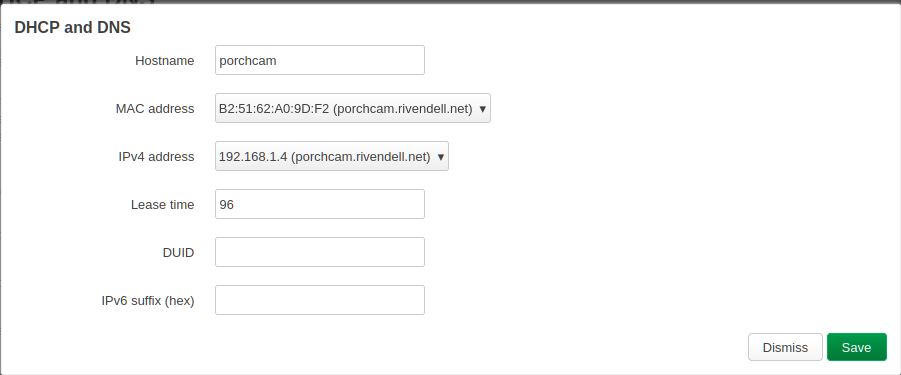
Save and repeat for the second camera. Finally, click Save and Apply.
Next step is to block each camera from the internet. We can do that with a firewall rule:
Network -> Firewall -> Traffic Rules -> General Settings:
- Name: Block-Porcncam
- Protocol: Any
- Source zone: lan
- Destination zone: wan
- Action: reject
-> Advanced Settings (same as static lease):
- Source MAC address: B2:51:62:A0:8D:F2
- Source IP address: 192.168.1.4
Save and then Save and Apply.
HTTP Stream Test
The camera apps have various settings; configre as needed. The will display the HTTP URL to use. I set up each for large image, 15 fps and to user port 8080. For ipCAM, to test and get the URL for ZoneMinder, open a browser and enter
http://192.168.1.4:8080
The above IP and port are examples. Click the MJPEG Video Browser link to test. For ZoneMinder use the MJPEG Video under Raw Video Links. You can also test with ffplay (part of ffmpeg package).
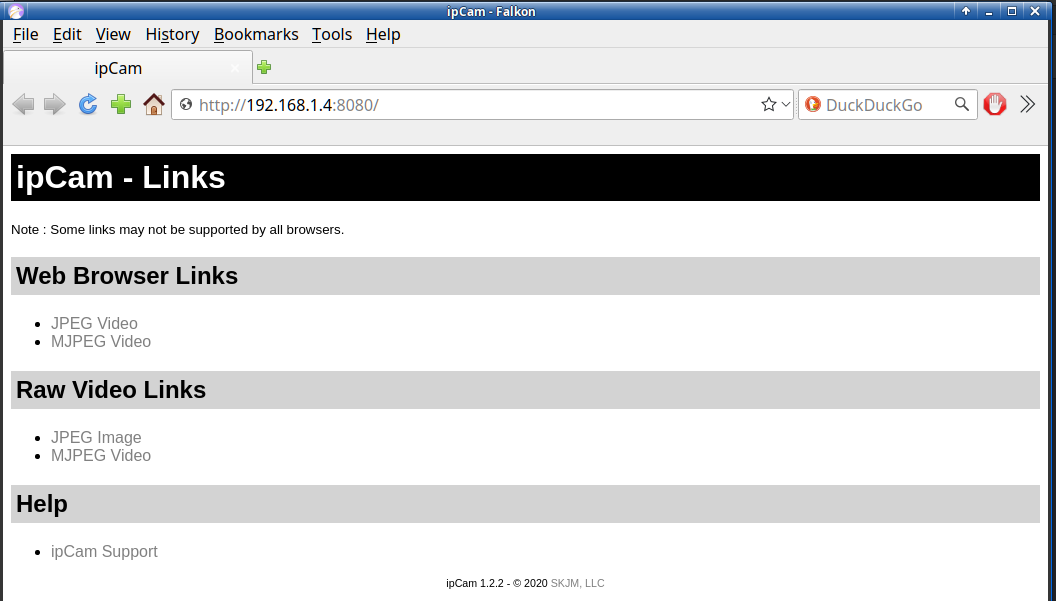
IP Webcam's page has a bunch of fancy features to play test. For our requirements, go to
Other Viewing Methods -> ZoneMinder
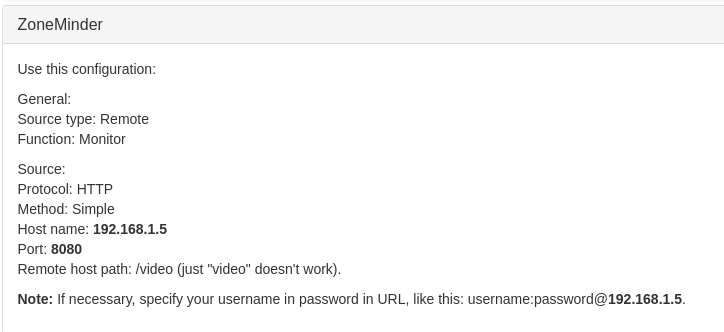
Configure ZoneMinder
ZoneMinder is a very full-featured, open source, state-of-the-art video surveillance software system available for Linux and Windows. Consult your OS for installarion procedures. For Slackware, download the buildscripts from Slackbuilds.org to create the install packages.
The ZoneMinder User Guide Documention is extensive. Create a new monitor for each camera and add the source URL for each. To start, the defaults are fine. Key settings:
- Source Type: ffmpeg
- Method: TCP
- Video Writer: H264 Passthrough
IP Web Cam has a handy ZoneMinder preset that sets up sane defaults.
ZoneMinder has a plethora of options. Configuration is left as an excercise for the reader. Play around and see what works best for you. You can also set up ZoneMinder to securely stream to their zmNinja phone app for remote monitoring on the go.
caveat - noun - /ˈkæv·iˌæt, ˈkɑ·viˌɑt/
A warning, for example about the use or effectiveness of something.
Cellphones are notoriously fickle pocket computers that are not very robust given their typical design of planned obsolescence.
- Short battery life requiring mounting near, or routing a cable from, a wall electrical socket.
- No night vision.
- Random reboots.
- Random crashes.
- Overheating (see 2. and 3. above).
- Pets, especially cats, love to unplug and/or chew on power cords.
So far, I've had the iPhone 6s and Nokia 7.1 run continuously for 2-3 days. YMMV.
Have fun and enjoy!
- Related Topics:
- slackware
- linux
- OpenWrt
- ZoneMinder
- IP Camera
Dmidecode System Information - Part 2
Posted on Jan 23, 2023 by kingbeowulf
As a follow-up to my previous post regarding obtaining system information via dmidecode, here is a small bash script for a quick motherboard summary using string keywords. This will display a short summary of your motherboard.
 1#!/bin/bash
 2
 3if [ $(id -u) != 0 ]; then
 4  echo "Please run as root, or use"
 5  echo "su -c \"sh $0\""
 6  exit 1
 7fi
 8
 9echo "Motherboard summary:"
10echo "--------------------"
11
12# string keywords, see 'man dmidecode'
13#bios-vendor, bios-version, bios-release-date, bios-revision,
14#firmware-revision, system-manufacturer, system-product-name,
15#system-version, system-serial-number, system-uuid,
16#system-sku-number, system-family, baseboard-manufacturer,
17#baseboard-product-name, baseboard-version, baseboard-serial-number,
18#baseboard-asset-tag, chassis-manufacturer, chassis-type,
19#chassis-version, chassis-serial-number, chassis-asset-tag,
20#processor-family, processor-manufacturer, processor-version,
21#processor-frequency
22
23for d in system-manufacturer system-product-name bios-release-date bios-version
24do
25   echo "${d^} : " $(dmidecode -s $d)
26done
27exit 0
1# sh mobo_summary.sh
2Motherboard summary:
3--------------------
4System-manufacturer :  Gigabyte Technology Co., Ltd.
5System-product-name :  X570 AORUS ELITE
6Bios-release-date :  10/14/2021
7Bios-version :  F36e
You can download a copy here. Note that, depending on the manufacturer, not all strings will contain valid information.
A Year in the Life of Slackware64-15.0
Posted on Jan 22, 2023 by kingbeowulf
Slackware 15.0 has been out in the wild for nigh on a year now. So far I am quite pleased. Modern and versatile for my varied requirements. I won't do a review here; that you can get elsewhere. For me, Slackware for many years has been my daily driver at home for general purpose office computing, simple image and video editing, internet access and video games. I was recently laid up at home on medical leave after surgery. Between Steam (native and Proton), WINE and DOSBOX, I made a bit of a dent in my Linux, Windows, and old MSDOS game collections. One Slackware box is dedicated to host my Gopher, Mumble, local LAN time servers, as well as my Valheim dedicated game server. It was also my backup NAS until I added added a separate Synology DS220+.
(Aside: If you haven't played Valheim, you are missing out on a great Adventure. Fun solo, but best with friends!)
 1# main System
 2$ neofetch
 3                  :::::::                      beowulf@gandalf.rivendell.net
 4            :::::::::::::::::::                -----------------------------
 5         :::::::::::::::::::::::::             OS: Slackware 15.0 x86_64 x86_64
 6       ::::::::cllcccccllllllll::::::          Host: Gigabyte Technology Co., Ltd. X570 AORUS ELITE
 7    :::::::::lc               dc:::::::        Kernel: 5.15.80
 8   ::::::::cl   clllccllll    oc:::::::::      Uptime: 5 days, 19 hours, 49 mins
 9  :::::::::o   lc::::::::co   oc::::::::::     Packages: 1911 (pkgtool)
10 ::::::::::o    cccclc:::::clcc::::::::::::    Shell: bash 5.1.16
11 :::::::::::lc        cclccclc:::::::::::::    Resolution: 2560x1440, 1440x2560
12::::::::::::::lcclcc          lc::::::::::::   DE: Xfce 4.16
13::::::::::cclcc:::::lccclc     oc:::::::::::   WM: Xfwm4
14::::::::::o    l::::::::::l    lc:::::::::::   WM Theme: Daloa
15 :::::cll:o     clcllcccll     o:::::::::::    Theme: Adwaita-dark [GTK2]
16 :::::occ:o                  clc:::::::::::    Icons: elementary-xfce-dark [GTK2], breeze-dark [GTK3]
17  ::::ocl:ccslclccclclccclclc:::::::::::::     Terminal: xfce4-terminal
18   :::oclcccccccccccccllllllllllllll:::::      Terminal Font: DejaVu Sans Mono 12
19    ::lcc1lcccccccccccccccccccccccco::::       CPU: AMD Ryzen 9 3900X (24) @ 3.800GHz
20      ::::::::::::::::::::::::::::::::         GPU: AMD ATI RX 5700 XT RAW II
21        ::::::::::::::::::::::::::::           Memory: 3286MiB / 32032MiB
22           ::::::::::::::::::::::
23                ::::::::::::
24
25# Home Server
26$ neofetch
27                  :::::::                      beowulf@aragorn.rivendell.net
28            :::::::::::::::::::                -----------------------------
29         :::::::::::::::::::::::::             OS: Slackware 15.0 x86_64 x86_64
30       ::::::::cllcccccllllllll::::::          Host: Gigabyte Technology Co., Ltd. X570 I AORUS PRO WIFI
31    :::::::::lc               dc:::::::        Kernel: 5.15.80
32   ::::::::cl   clllccllll    oc:::::::::      Uptime: 37 days, 20 hours, 46 mins
33  :::::::::o   lc::::::::co   oc::::::::::     Packages: 1849 (pkgtool)
34 ::::::::::o    cccclc:::::clcc::::::::::::    Shell: bash 5.1.16
35 :::::::::::lc        cclccclc:::::::::::::    Terminal: /dev/pts/4
36::::::::::::::lcclcc          lc::::::::::::   CPU: AMD Ryzen 7 3800X (16) @ 3.900GHz
37::::::::::cclcc:::::lccclc     oc:::::::::::   GPU: NVIDIA GeForce GTX 960
38::::::::::o    l::::::::::l    lc:::::::::::   Memory: 6639MiB / 32054MiB
39 :::::cll:o     clcllcccll     o:::::::::::
40 :::::occ:o                  clc:::::::::::
41  ::::ocl:ccslclccclclccclclc:::::::::::::
42   :::oclcccccccccccccllllllllllllll:::::
43    ::lcc1lcccccccccccccccccccccccco::::
44      ::::::::::::::::::::::::::::::::
45        ::::::::::::::::::::::::::::
46           ::::::::::::::::::::::
47                ::::::::::::
- Related Topics:
- slackware
- general
- slackware64
- desktop
Astronomy Device Control In Slackware-15 and -Current
Posted on Aug 23, 2022 by kingbeowulf
I've updated the INDI libraries and drivers on Slackbuilds.org (SBo). INDI Library is a collection of programs designed to control astronomical equipment, such as, cameras, telescopes, etc. In addition to the drivers and modules provided in the main INDI distribution, there are a number of third party drivers available. For more information on INDI refer to https://www.indilib.org/
Stellarium (https://slackbuilds.org/repository/15.0/academic/stellarium/) has INDI support to directly control telescope positioning. Kstars, included with Slackware's KDE, Provides INDI support via the built-in EKOS client. Besides telescope control, numerous devices are supported, including CCD cameras. Why pay good money for proprietary and expensive telescope GOTO and astrophotography software when perfectly functional opensource alternatives exist?
To get Kstars/Ekos operational in Slackware (or whatever other Linux distribution. I won't judge.), you will need to recompile Kstars. INDI is a compile-time dependency; therefore, the Kstars package included with Slackware does not include INDI functionality.
Feedback is appreciated, for bugs and improvements, via sbo@linuxgalaxy.org
For Slackware (What? Are you still using that *other* distro?), follow this build order. Everything needed is included either in the main Slackware tree or on SBo. Note that the SBo buildscripts for libindi-libraries and libindi-drivers are optional. These include the third party drivers not present in the main libindi build. This list is also the recommended build and installation order. If you do not know what drivers you need (!!), install everything.
Dependency
libev
libnova
wcslib
stellarsolver
[optional for third-pary drivers]
gpsd
libdc1394
libftdi1
INDI
libindi
libindi-libraries (optional)
libindi-drivers (optional)
Kstars INDI Client
Kstars in Slackware-15 is a bit too old. Grab the Kstars source from Slackware current or from https://invent.kde.org/education/kstars/-/branches (version 3.6.0 as of this post). On Slackware current, this should be enough to recompile Kstars so that INDI gets incorporated. Example is for Slackware-current downloaded to '/data/ and assuming KDE is installed.
1# su -
2# cd /data/slackware[64]-current/source/kde/kde
3# ./kde.SlackBuild applications-extra:kstars
4# upgradepkg --reinstall /tmp/kstars-3.6.0-[x86_64,i586]-1.txz
To build kstars-3.6.0 on Slackware-15, you can use these buildscript files: kstars.SlackBuild, doinst.sh. slack-desc. Files are located https://www.linuxgalaxy.org/files/sbo-testing/15.0/academic/kstars/
Apologies to native Catalan speakers: see https://invent.kde.org/education/kstars/-/issues/186
Slackware-15 kdoctools are too old for newer kstars. This is not an issue with Slackware-current.
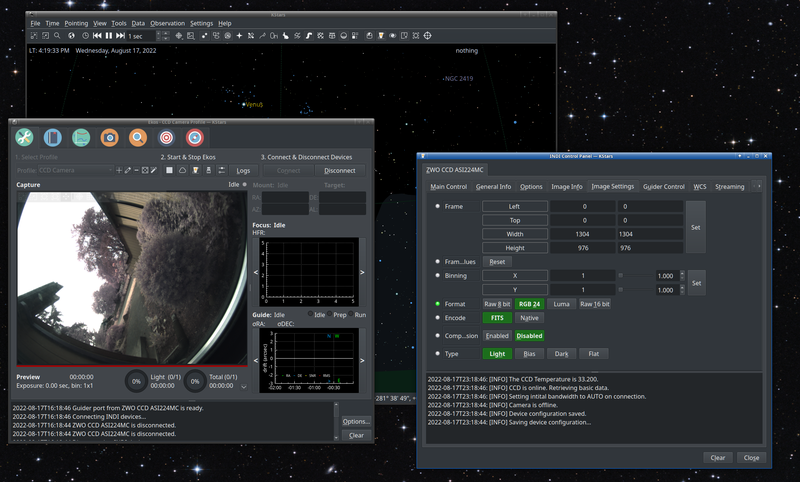
Here is an example screenshot or kstars operating the ZWO ASI224MC CCD astronmy camera.
Slackware-current Graphics Stack Upgrade
Posted on Aug 09, 2022 by kingbeowulf
After the release of Slackware-15.0 (stable), not only is our BDFL* keeping up with security updates, but Slackware-current is progressing at at relentless pass. This week the Slackware gaphics stack gets upgrades for Mesa, X.org and Wayland, but more significantly, also removes a bunch of legacy drivers.
1Mon Aug  8 23:29:31 UTC 2022
2Hey folks, here's that graphics stack upgrade that you've been waiting for!
3After looking at what drivers are currently shipped by other projects, I took
4an axe to the driver list. Some of the removed drivers will still compile even
5though they are abandoned, and some of the others are still getting git commits
6(which allows *some* of them to compile). The removed stuff mostly looks
7obsolete to me (we really can't support ancient hardware forever). But if you
8think I've gone too far with any of these removals, please make or contribute
9to a thread about it on LQ and I'll take any comments there into consideration.
Time to say a bittersweet goodbye to some of the GPU drivers from on my old Slackware boxes from the 1990s and early 2000s that are now all in hardware heaven.
1xf86-video-cirrus
2xf86-video-mach64
3xf86-video-nv
4xf86-video-r128
5xf86-video-s3
6xf86-video-s3virge
7xf86-video-savage
8xf86-video-tdfx
9xf86-video-voodoo
*Benevolent Dictator for Life.
Linux System Information via dmidecode and inxi
Posted on Jun 29, 2022 by kingbeowulf
dmidecode is a userspace command-line utility for Linux that can parse the SMBIOS data of your computer. This utility is handy to display system information without having to reboot into the UEFI/BIOS. Details are in 'man dmidecode' for the various options; I prefer the "--t, --type TYPE" option as it also uses human readable TYPE keywords to groups and drill into the specific information needed. The inxi utility usues dmidecode (and many other utilities) and some nice formatting to deliver comprehensive system information.
| Keyword | Types |
|---|---|
| bios | 0, 13 |
| system | 1, 12, 15, 23, 32 |
| baseboard | 2, 10 |
| chassis | 3 |
| processor | 4 |
| cache | 5, 6, 16, 17 |
| connector | 8 |
| slot | 9 |
Here are some examples to locate the BIOS version and mother board information.
 1# dmidecode -t bios
 2# dmidecode 3.3
 3Getting SMBIOS data from sysfs.
 4SMBIOS 3.3.0 present.
 5
 6Handle 0x0000, DMI type 0, 26 bytes
 7BIOS Information
 8	Vendor: American Megatrends International, LLC.
 9	Version: F36e
10	Release Date: 10/14/2021
11	Address: 0xF0000
12	Runtime Size: 64 kB
13	ROM Size: 16 MB
14	Characteristics:
15		PCI is supported
16		BIOS is upgradeable
17		BIOS shadowing is allowed
18		Boot from CD is supported
19		Selectable boot is supported
20		BIOS ROM is socketed
21		EDD is supported
22		Japanese floppy for NEC 9800 1.2 MB is supported (int 13h)
23		Japanese floppy for Toshiba 1.2 MB is supported (int 13h)
24		5.25"/360 kB floppy services are supported (int 13h)
25		5.25"/1.2 MB floppy services are supported (int 13h)
26		3.5"/720 kB floppy services are supported (int 13h)
27		3.5"/2.88 MB floppy services are supported (int 13h)
28		Print screen service is supported (int 5h)
29		Serial services are supported (int 14h)
30		Printer services are supported (int 17h)
31		CGA/mono video services are supported (int 10h)
32		ACPI is supported
33		USB legacy is supported
34		BIOS boot specification is supported
35		Targeted content distribution is supported
36		UEFI is supported
37	BIOS Revision: 5.17
38
39Handle 0x0032, DMI type 13, 22 bytes
40BIOS Language Information
41	Language Description Format: Long
42	Installable Languages: 15
43		en|US|iso8859-1
44		zh|TW|unicode
45		zh|CN|unicode
46		ru|RU|iso8859-5
47		de|DE|iso8859-1
48		ja|JP|unicode
49		ko|KR|unicode
50		es|ES|iso8859-1
51		fr|FR|iso8859-1
52		it|IT|iso8859-1
53		pt|PT|iso8859-1
54		vi|VI|iso8859-1
55		id|ID|iso8859-1
56		tr|TR|iso8859-1
57		pl|PL|iso8859-1
58	Currently Installed Language: en|US|iso8859-1
 1# dmidecode -t system
 2# dmidecode 3.3
 3Getting SMBIOS data from sysfs.
 4SMBIOS 3.3.0 present.
 5
 6Handle 0x0001, DMI type 1, 27 bytes
 7System Information
 8	Manufacturer: Gigabyte Technology Co., Ltd.
 9	Product Name: X570 AORUS ELITE
10	Version: -CF
11	Serial Number: Default string
12	UUID: 03c00218-044d-0503-e306-b20700080009
13	Wake-up Type: Power Switch
14	SKU Number: Default string
15	Family: X570 MB
16
17Handle 0x0006, DMI type 12, 5 bytes
18System Configuration Options
19	Option 1: Default string
20
21Handle 0x0007, DMI type 32, 20 bytes
22System Boot Information
23	Status: No errors detected
Please note that, depending on your hardware SMBIOS implementation, not all TYPEs may be available. System and memory information via inxi, in comparison:
 1# inxi -M
 2Machine:
 3  Type: Desktop System: Gigabyte product: X570 AORUS ELITE v: -CF serial: N/A
 4  Mobo: Gigabyte model: X570 AORUS ELITE serial: N/A
 5    UEFI: American Megatrends LLC. v: F36e date: 10/14/2021
 6
 7# inxi -m
 8Memory:
 9  RAM: total: 31.34 GiB used: 2.73 GiB (8.7%)
10  Array-1: capacity: 128 GiB slots: 4 EC: None
11  Device-1: DIMM 0 size: 8 GiB speed: 3600 MT/s
12  Device-2: DIMM 1 size: 8 GiB speed: 3600 MT/s
13  Device-3: DIMM 0 size: 8 GiB speed: 3600 MT/s
14  Device-4: DIMM 1 size: 8 GiB speed: 3600 MT/s
Slackware 15.0 is released!
Posted on Feb 03, 2022 by kingbeowulf
As a fan and user of the best Gnu/Linux distribution by far, I am all a-quiver with this new release. Slackware-14.2 still worked well as a desktop operating system, but after 6 years, even for an LTS, it was getting a bit crusty. Read the announcements and enjoy! Don't forget Slackware now has a live boot image if you just want to take Slackware for a test drive.
Convert Date Formats in a Text file with Perl
Posted on Jan 15, 2022 by kingbeowulf
A query was posted recently on a list on how to convert date formats in the form of "month/day/year" into a more standard unambiguous "year-month-day". I dabbled in Perl a very long time ago and so thought I'd take a look. After searching the Internet and some practice, here is my stab at it. For an example csv text file, for tabular data in this case:
1COLA,DATE,COLB,COLC
2xxxx,12/15/2021,xxxx,xxxx
3xxxx,01/14/2022,xxxx,xxxx
The following Perl script will flip the order.
 1#!/usr/bin/perl
 2
 3# searches for xx/yy/zzzz (month/day/year) date pattern and converts
 4# to zzzz-xx-yy in a text file (csv in this case).
 5
 6open(FH,"myfile.csv") or die "Can’t open file-$1";
 7open(WH,">new_myfile.csv") or die "Can’t open file in write mode- $!";
 8
 9while(my $line = <FH>){
10               $line =~s/(\d{2})\/(\d{2})\/(\d{4})/$3-$1-$2/g;
11               print WH $line;
12}
13
14close(FH);
15close(WH);
We now have:
1COLA,DATE,COLB,COLC
2xxxx,2021-12-15,xxxx,xxxx
3xxxx,2022-01-14,xxxx,xxxx
Just announced, Slackware 15.0 takes another step closer to release!
Posted on Jan 13, 2022 by kingbeowulf
From today's change log:
 1Wed Jan 12 22:04:33 UTC 2022
 2Good hello, and welcome to the third and final release candidate for Slackware
 315.0. We're 99% frozen at this point and are mostly looking for regression or
 4other bug reports that might be able to be addressed before this goes stable.
 5Of course, the management here reserves the right to make exceptions... that
 65.15.15 kernel version has a nice ring to it. If your requests didn't make it
 7into this iteration, perhaps we will revisit them for the next -current cycle.
 8Some were just a little too late but will more than likely be needed next time
 9(I'm looking at Didier's grubconfig), while others are just out of scope for
10the main tree where I like to abide by YAGNI as much as possible.
11Anyway, let's get some testing done and we'll be there soon. Enjoy! :-)
Older posts
Contact:
- kingbeowulf@linuxgalaxy.org
- mumble.linuxgalaxy.org:64738
- Libera.chat IRC
- ##slackware, #slackbuilds, #linuxgalaxy
Screamin' and a-streamin' !
- https://twitch.tv/kngbwlf
- https://www.youtube.com/@mylinuxgalaxy
Advertisement
Tired of Steam, Epic and other rip-off game "stores"? Check out Humble Bundle for your digital download needs! A portion of your hard-earned gaming cash goes to charity.
King Beowulf's Humble Bundle Referral CodeCitizen Science!

