Slackware makes the jump to kernel 5.10.x and Xfce-4.16
Posted on Jan 03, 2021 by kingbeowulf
The pace of Slackware Current updates in December was incredible. Fast on the heals of KDE/Plasma 5, we have updates to Kernel 5.10 and then, just in time for Santa, Xfce-4.16. Numerous fixes and additional updates are happening throughout. Refer to the change logs for details: Slackware Change Logs
After the start of the New Year, can a Slackware 15.0 release be far behind?
Gandalf The White - Ryzen 9 3900X
Posted on Nov 30, 2020 by kingbeowulf
Here's the long awaited update to my Slackware rebuild started in October (see 'To Everything There Is a Season' post Oct. 10, 2020). The new Ryzen system is up and running Slackware64-current multilib. I am a couple of weeks behind on updates. The new KDE/Plasma5 and Xfce 4.14 just hit /testing and should soon be merged in the main tree. The 15.0 release is looking good so far and will really shine on this new system.
 1.                 :::::::                      beowulf@gandalf.rivendell.net
 2            :::::::::::::::::::                -----------------------------
 3         :::::::::::::::::::::::::             OS: Slackware 14.2 x86_64 (post 14.2 -current) x86_64
 4       ::::::::cllcccccllllllll::::::          Host: X570 AORUS ELITE -CF
 5    :::::::::lc               dc:::::::        Kernel: 5.4.77
 6   ::::::::cl   clllccllll    oc:::::::::      Uptime: 13 days, 20 hours, 19 mins
 7  :::::::::o   lc::::::::co   oc::::::::::     Packages: 1612 (pkgtool)
 8 ::::::::::o    cccclc:::::clcc::::::::::::    Shell: bash 5.0.18
 9 :::::::::::lc        cclccclc:::::::::::::    Resolution: 3840x2160
10::::::::::::::lcclcc          lc::::::::::::   DE: Xfce 4.12
11::::::::::cclcc:::::lccclc     oc:::::::::::   WM: Xfwm4
12::::::::::o    l::::::::::l    lc:::::::::::   WM Theme: Kokodi
13 :::::cll:o     clcllcccll     o:::::::::::    Theme: Xfce-curve [GTK2], Adwaita [GTK3]
14 :::::occ:o                  clc:::::::::::    Icons: Adwaita [GTK2/3]
15  ::::ocl:ccslclccclclccclclc:::::::::::::     Terminal: xfce4-terminal
16   :::oclcccccccccccccllllllllllllll:::::      Terminal Font: Monospace 12
17    ::lcc1lcccccccccccccccccccccccco::::       CPU: AMD Ryzen 9 3900X (24) @ 3.800GHz
18      ::::::::::::::::::::::::::::::::         GPU: AMD ATI Radeon RX 5600 OEM/5600 XT / 5700/5700 XT
19        ::::::::::::::::::::::::::::           Memory: 3906MiB / 32124MiB
20           ::::::::::::::::::::::
21                ::::::::::::
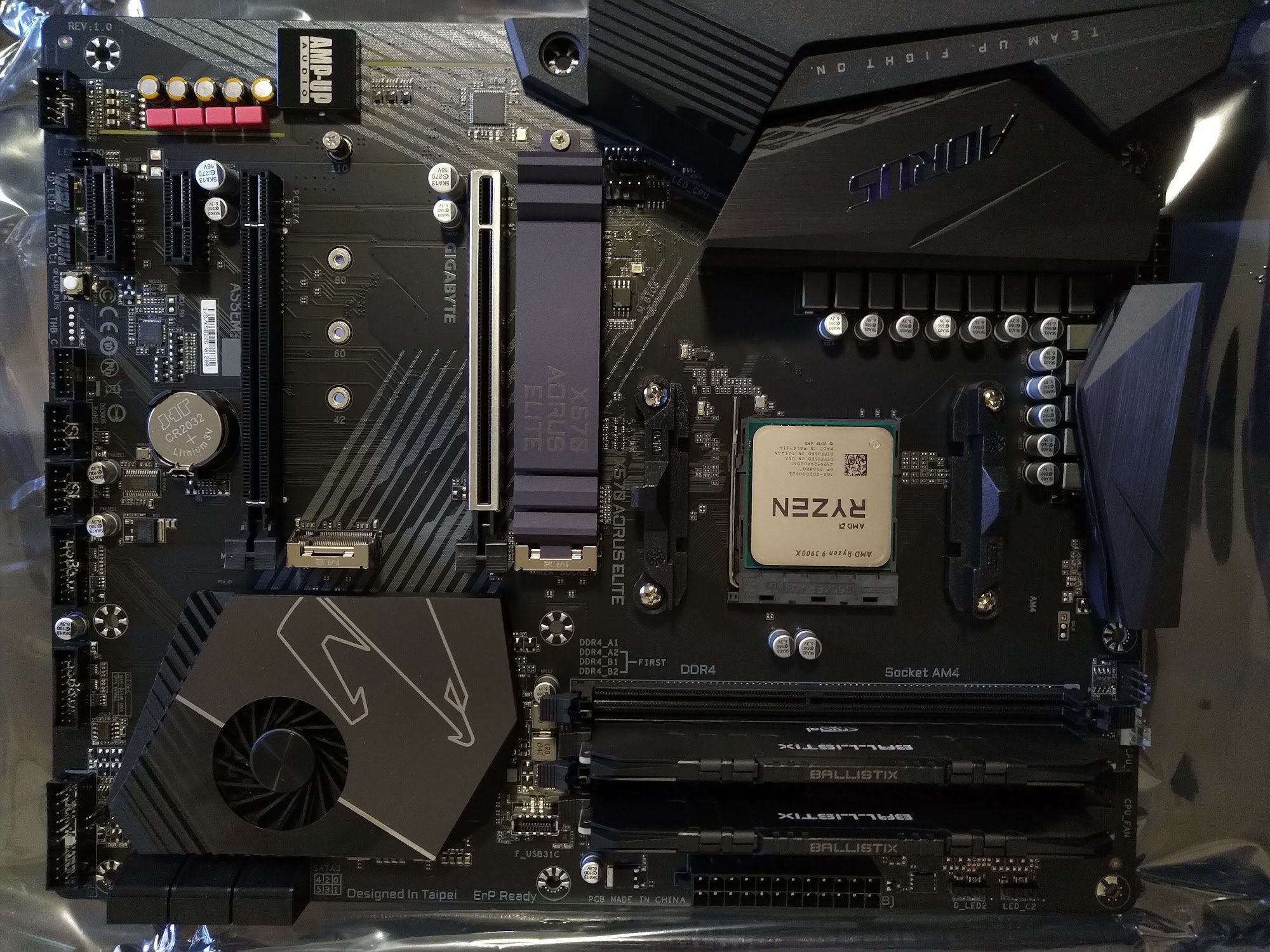
All assembled with NO LEDS!, cleaned/polished, and ready for action. Besides the liquid cooled Ryzen 9 3800X we have:
GIGABYTE AORUS Gen4 M.2 2280 1TB PCI-Express 4.0 x4, NVMe
Crucial Ballistix 32GB (2 x 16GB) 288-Pin DDR4 SDRAM DDR4 3600 (PC4 28800)
- Related Topics:
- motherboard
- Ryzen
- AMD
Web site editor errors on paste using Firefox
Posted on Nov 28, 2020 by kingbeowulf
Recently we ran into a glitch using an online editor in a website CMS with the Firefox browser. Every time we tried to paste plain text into the editor, the editor would crash or display an error message. Other browsers worked fine (chromium, SeaMonkey), and Firefox worked fine on other workstations. It turns out it was the method some online editors use to process clipboard events. In 'about:config' the offending browser had
dom.event.clipboardevents.enabled
set to 'false'. Resetting to 'true' fixed the issue (the default setting). I had probably set this, or some no longer in use add-on/extension had set it, to enforce additional security or privacy.
To Everything There Is a Season
Posted on Oct 10, 2020 by kingbeowulf
It is finally time to say goodbye to the MSI X99S Krait SLI build from 2014. This was my first Intel CPU build since 1999-2000. That winter I built an Athlon64 system with a Gigabyte Geforce 256DDR as more performance than what Intel offered (no 64-bit!) at a much better price.
It was shortly thereafter that I briefly switched to SLAMD64 until Slackware64 was released.
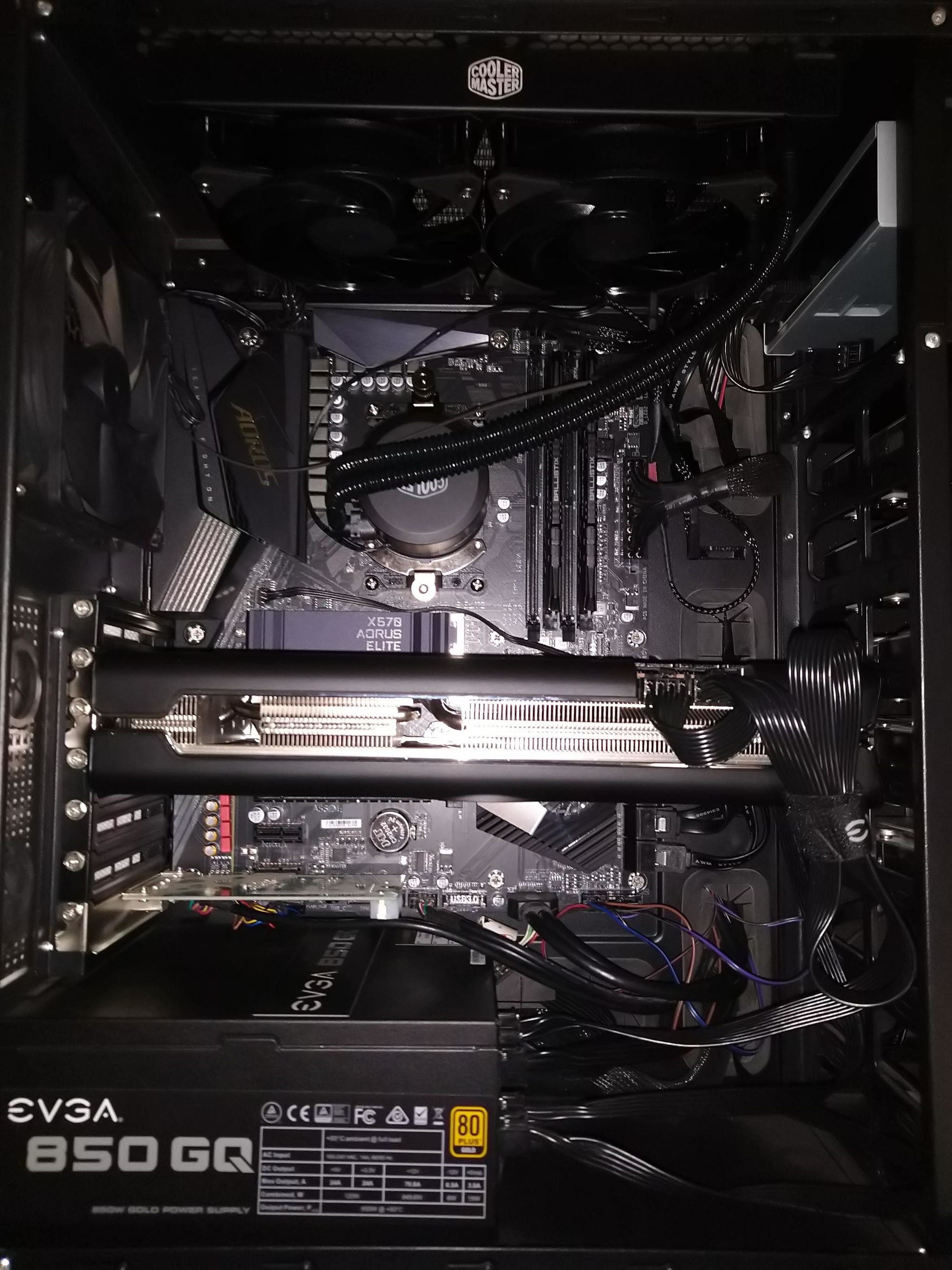
I started out with an Intel i7-5820k and 16 GB DDR4, with a Gigabyte Geforce GTX660 Windforce. Then came the EVGA GTX 1060, followed by an additional 16 GB DDR4 (I deplore empty slots...), 256 GB NVME, and the current Intel i7-6850K. When I added the new CPU I upgraded the passive CPU heatsink and fan with a Thermaltake 240mm dual fan closed loop liquid coolor (Water 3.0 pump).
When Slackware64-current added kernel 5.4.x, I temporarily blacked out and replaced the Nvidia GPU with the
** XFX Radeon RX 5700 XT THICC Ultra III **
Why? Absolutely no idea. As I said, I must have blacked out. This is a massive GPU card and barely fits in the Antec P100 case.
The bonus of a Navi class CPU on kernel 5.4 is that I can now run a full opensource amdgpu/Mesa GPU stack with OpenGL and vulkan hardware 3D accelleration. I can hardly wait to see what this PCI-express 4.0 card can do on the new GIGABYTE X570 AORUS ELITE AMD Ryzen motherboard with PCI-express 4.0
Now I just have to rip out the old Intel guts, and plug in the new AMD guts...and clean out the dust.
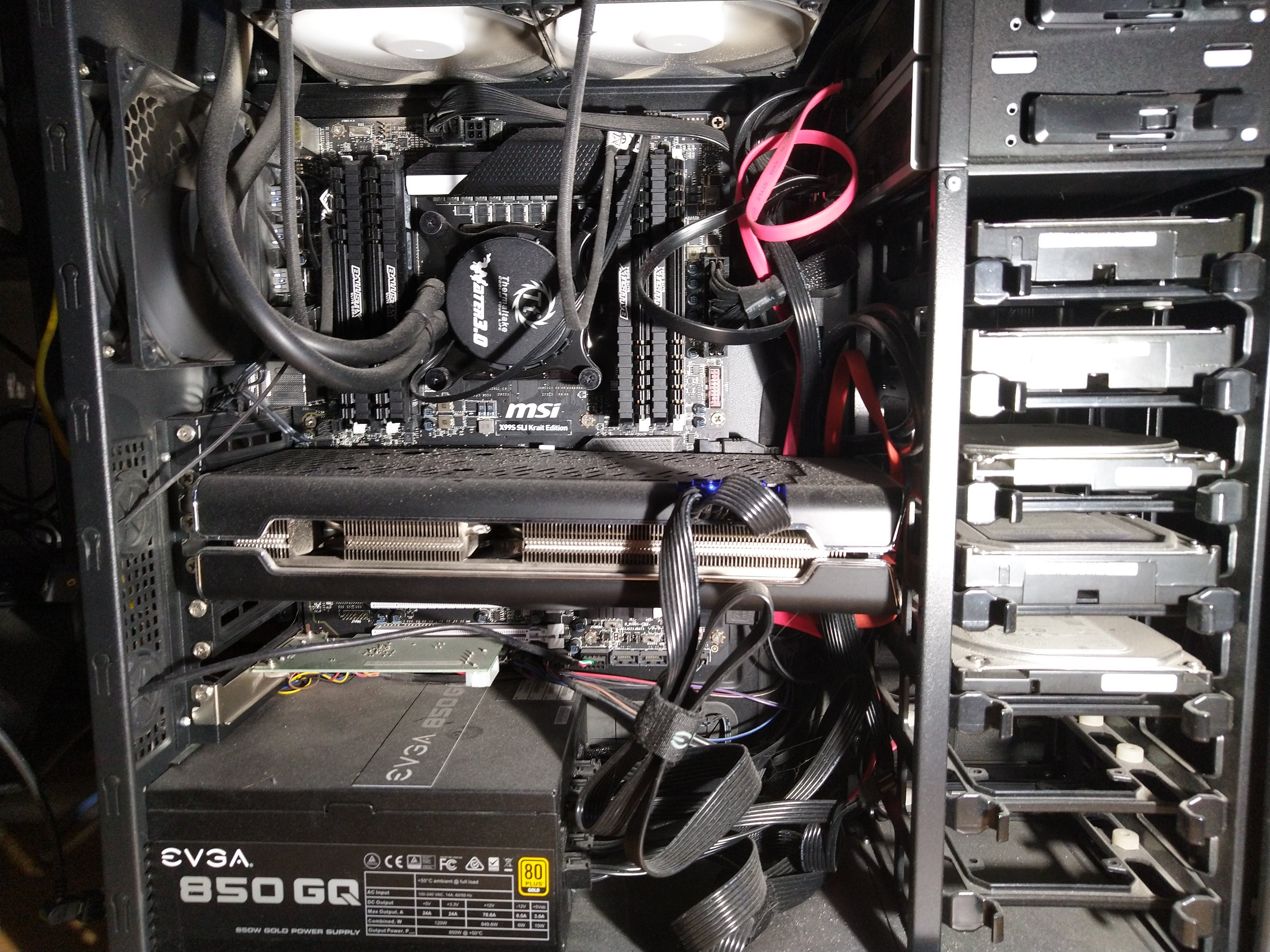
Gandalf the Grey is dead.
Long live Gandalf the White!
Correct erroneous dual monitor position in Xfce
Posted on Jul 22, 2020 by kingbeowulf
For many years I used nvidia drivers and utilities along with an xorg.conf to set up 2 to 3 monitors on KDE and Xfce. Recently I switched to the new AMD NAVI GPUs (RX 590 and RX 5700 XT) and the new Slackware-current amdgpu driver stack. In KDE, setting up dual monitors was easy in their display GUI, but Xfce-4.12 was problematic. No matter what I did, the second monitor was always on the virtual right side of the primaty monitor, or the primary and secondary were switched. A workaround is to invoke xrandr directly:
1xrandr --output DisplayPort-0 --primary --mode 3840x2160 --rate 60 --output DisplayPort-1 --mode 1920x1080 --rate 60 --left-of DisplayPort-0
Placing this command in $HOME/.xinitrc automates the process. This also
fixed tthe monitor jumbling when using the screensaver and/or powering
off the monitors.
- Related Topics:
- dual monitor
- X.org
- Xfce
Enable KVM on Gigabyte X570 Motherboards
Posted on May 10, 2020 by kingbeowulf
On some AMD Ryzen X570 (Gigabyte) motherboards, virtualization is disabled in the UEFI firmware (BIOS). If are having trouble running qemu or virtualbox, the kvm module is loaded, and lscpu indicates that the CPU supports KVM, go into the BIOS, Tweaker menu tab (advanced mode), find "Advanced CPU settings" and enable "SVM mode".
On some boards, you can find the KVM settings under "Advanced CPU Core Settings" option group, under M.I.T tab - "Advanced Frequency Settings" option group - frequency settings - CPU core settings.
John Conway (26 December 1937 - 11 April 2020)
Posted on Apr 13, 2020 by kingbeowulf
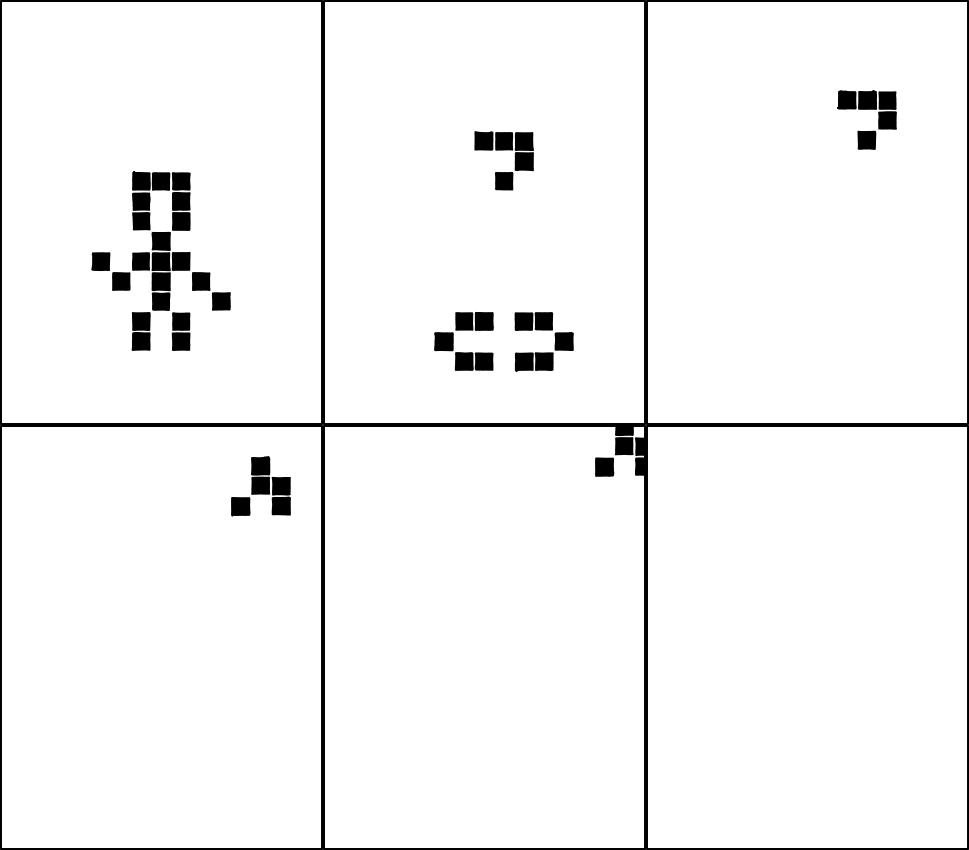
We regret to announce that John Conway, the John von Neumann Professor Emeritus of Applied and Computational Mathematics and Professor Emeritus of Mathematics, died April 11. He was 82 -- Princeton University
- Related Topics:
Disappearing Optical Drives
Posted on Mar 19, 2020 by kingbeowulf
One of my Slackware systems has two optical drives: Blu-Ray and DVD: /dev/sr0 and /dev/sr1. In 14.2 as well as current, if neither are used for awhile, some of the udev symlinks to /dev/sr0 disappear. This becomes maddening (as in WTF?) when I'm trying to run my qemu VMs and I get the error:
1qemu-system-x86_64: -cdrom /dev/dvd: Could not open '/dev/dvd': No such file or directory
Taking a peek shows:
1$ ls -l /dev/dv*
2lrwxrwxrwx 1 root root 3 Mar 14 14:32 /dev/dvd1 -> sr1
3lrwxrwxrwx 1 root root 3 Mar 14 14:32 /dev/dvdr1 -> sr1
4lrwxrwxrwx 1 root root 3 Mar 14 14:32 /dev/dvdrw1 -> sr1
5lrwxrwxrwx 1 root root 3 Mar 14 14:32 /dev/dvdwriter1 -> sr1
instead of the expected list:
 1$ ls -l /dev/dv*
 2lrwxrwxrwx 1 root root 3 Mar 19 19:00 /dev/dvd -> sr0
 3lrwxrwxrwx 1 root root 3 Mar 19 19:00 /dev/dvd0 -> sr0
 4lrwxrwxrwx 1 root root 3 Mar 19 19:00 /dev/dvd1 -> sr1
 5lrwxrwxrwx 1 root root 3 Mar 19 19:00 /dev/dvdr -> sr0
 6lrwxrwxrwx 1 root root 3 Mar 19 19:00 /dev/dvdr0 -> sr0
 7lrwxrwxrwx 1 root root 3 Mar 19 19:00 /dev/dvdr1 -> sr1
 8lrwxrwxrwx 1 root root 3 Mar 19 19:00 /dev/dvdrw -> sr0
 9lrwxrwxrwx 1 root root 3 Mar 19 19:00 /dev/dvdrw0 -> sr0
10lrwxrwxrwx 1 root root 3 Mar 19 19:00 /dev/dvdrw1 -> sr1
11lrwxrwxrwx 1 root root 3 Mar 19 19:00 /dev/dvdwriter -> sr0
12lrwxrwxrwx 1 root root 3 Mar 19 19:00 /dev/dvdwriter0 -> sr0
13lrwxrwxrwx 1 root root 3 Mar 19 19:00 /dev/dvdwriter1 -> sr1
Rebooting or reloading the udev rules (as root) restores the expected symlinks:
1# udevadm control --reload-rules && udevadm trigger
I suppose I could just tell qemu to look at /dev/sr0, but where's the fun in that?
- Related Topics:
- slackware
- optical drive
- DVD
- CD
Slackware64-Current (15.0): mini-ITX Benchmarks Part 3
Posted on Feb 08, 2020 by kingbeowulf
I have finally had some time to compile the benchmarks for a series of GPUs on the new mini-ITX build. The purpose was to see if the amdgpu driver is ready to compete with Nvidia on a Linux powered game box. The GPUs choices are simply what I had available and fairly recent, except for the RX 5700 XT, which was a new purchase.
System Configuration
1GIGABYTE X570 I AORUS PRO WIFI  Mini-ITX
2AMD RYZEN 7 3800X
3Patriot Viper Steel 16GB DDR4 4400 (PC4 35200)
4Samsung U28E590 (4K)
Software
Slackware development is proceeding at a brisk pace: kernel is 5.4.22 as of this writing, along with numerous updates. Since I have since sold the GTX 1060, I will not repeat the benchmarks. These results still give a good snapshot into the state of amdgpu and Slackware.
1Slackware64-current (15.0) multilib 08-Feb-2020
2KDE 4.14.38
3kernel 5.4.14
4amdgpu 19.1.0
5Mesa 19.3.2
6X server 1.20.7
7Nvidia 440.44
The GPU Contenders
1EVGA GTX 1060 6GB (ITX single fan)
2Nvidia GTX 1080 Founders Edition
3XFX Radeon RX590 Fatboy OC+
4XFX Radeon RX 5700 XT THICC Ultra
Benchmarks
1Phoronix Test Suite 9.2.1 (PTS)
2SuperTuxKartv.0.9.3 (STK)
3Unigine
4vkmark v2018-05-30
Results
All benchmark were run at default PTS settings and default GPU clocks. For the GTX 1060, I added runs comparing the nouveau driver. Some of the benchmarks did not complete using the nouveau driver. Although nouveau is fine for general desktop use, for gaming and other heavy 3D tasks, amdgpu or Nvidia is required. At this stage, it looks like amdgpu can keep up with the Nvidia proprietary drivers quite well. The RX 590 is the same general generation as the GTX 1060 and is on par with the nvidia driver on the Unigine benchmarks. The RX 590 outperforms the GTX 1060 by a good margin on STK. There were some anomalously high frame rate on some of the STK 4K maps. These may be due to the skipping of some texture or other feature at that resolution.
The monstrous XFX Radeon RX 5700 XT THICC Ultra (so THICC...barely fits in my full tower case) is aggressively factory clocked and aimed to compete with the GTX 2060/2070 generation cards. The tests were run with the dual BIOS switch set to quiet mode. This keeps the 3 fans off until the temperature exceeds 60° C. I haven’t tried the OC switch position yet. The RX 5700 XT is marketed as a 1440p card; I decided to push it hard on 4K on the Unigine benchmarks with amdgpu driver. It generally outperforms the GTX 1060 and GTX 1080.
The Unigine Superposition benchmark is a heavy stress test of the PC and GPU. Here the amdgpu driver perform quite well against Nvidia. The PC as well as all cards struggled at 4K ultra mode setting (<8 fps), with the RX 5700 XT taking the lead at 8 fps. At more reasonable 4K settings, the results where fun to watch on screen, and showed the potential of the amdgpu driver.
The RX 5700 XT performs quite well at 4K with the following Steam games I’ve tried so far:
1Borderlands 2
2Dying Light
3CS:Go
4Valley (missing tent and flag textures)
5Skyrim (WINE 5.0)
6The Talos Principle
7Serious Sam Fusion 2017
These last 2 use vulkan and I set RADV_PERFTEST=aco to use Valve’s higher performing ACO shader compiler [EDIT: No longer needed; ACO is now enabled by default]. These games were run on my i7-6850K 32GB tower PC, with Freesync and tearfree turned on.
Conclusion
The Mesa and amdgpu drivers currently don’t just show promise, but are now ready for immersive 3D games. If you are tired of fighting with Nvidia installations, or just the outrageous expense, give AMD Radeon a try.
As always: YMMV!
Acknowledgements
Thanks to Pat Volkerding for Slackware, and to numerous contributors to Slackware, and to the Slackware community. Thanks also to ttks (freenode ##slackware-help) for his generous financial contribution.
Slackware64-Current (15.0): mini-ITX it87 ITE 8688 sensor
Posted on Jan 20, 2020 by kingbeowulf
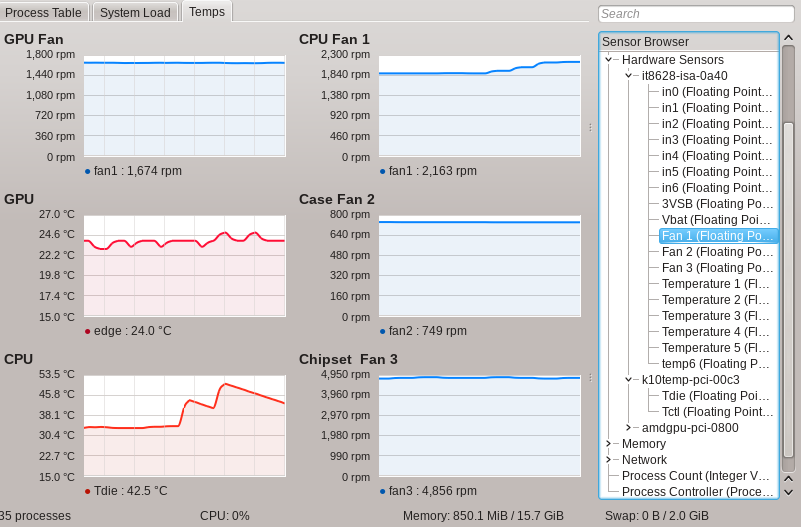
In the "what could go wrong category" for information found on the interwebs, there is a work around for the missing support for the 0x8688 sensor in the new Gigabyte GIGABYTE X570 I AORUS PRO motherboard. [EDIT: This seems to be applicable to any GIGABYTE AURUS X570 motherboard to at least kernel 5.4.x]
Out of the box, CPU temperatures/voltages are available (k10temp), as are GPU temperatures/fan and voltages (amdgpu). Motherboord and CPU fans however are missing. To the kernel boot parameters in '/boot/efi/EFI/Slackware/elilo.conf' add 'acpi_enforce_resources=lax':
1image=vmlinuz
2label=vmlinuz
3initrd=initrd.gz
4read-only
5append="root=/dev/sda2 vga=normal ro acpi_enforce_resources=lax"
Then load the it87 module in rc.local (or /etc/modeprobe.d/ if preferred):
1/sbin/modprobe it87 force_id=0x8628
to force the closest compatible sensor ID. Now, I have the sensor data. I'm not sure how accurate the motherboard temperatures and voltages are, but the fan speeds appear correct. Fan assignments were determined by unplugging each one to observe the drop to zero rpm.
Older posts
Contact:
- kingbeowulf@linuxgalaxy.org
- mumble.linuxgalaxy.org:64738
- Libera.chat IRC
- ##slackware, #slackbuilds, #linuxgalaxy
Screamin' and a-streamin' !
- https://twitch.tv/kngbwlf
- https://www.youtube.com/@mylinuxgalaxy
Advertisement
Tired of Steam, Epic and other rip-off game "stores"? Check out Humble Bundle for your digital download needs! A portion of your hard-earned gaming cash goes to charity.
King Beowulf's Humble Bundle Referral CodeCitizen Science!

