A home for Science, Technology, and Slackware.
Recent Updates
Slackware Linux 15.0 Beta released
Posted on Apr 16, 2021 by kingbeowulf
Slackware 15.0 Beta (current branch) released earlier this week, and it's shaping up quite well. From the ChangeLog:
Read more...
Setting up Valheim Dedicated Server on Slackware64
Posted on Apr 11, 2021 by kingbeowulf
This guide will assist in setting up a Valheim Dedicated Server (VHDS) on Slackware64-current. This procedure should also work on Slackware6-14.2, although additional prerequisites may be required. The process is similar to setting up a Half-Life Dedicated Server (HLDS) with one important simplification. We will be using LinuxGSM: the Linux Game Server Manager.
LinuxGSM is a command line tools written in BASH to greatly simplify and streamline the installation of Linux dedicated game servers. The instructions are easy and straightforward.
Prerequisites
---------------
- Slackware64 multilib
- steamCMD (32-bit only)
- LinuxGSM (bash) [NOTE: LinuxGSM will install steamCMD.]
The VHDS is x86_64 while SteamCMD is 32-bit. Thus, we need to convert Slackware64 to Slackware64-multilib. Instructions for doing so are described in "Adding Multilib Capability to Slackware on x86_64 Architecture". If you've set up the Steam Client on Slackware64, then you are familiar with this process.
As the 'root' user, you first create a dedicated user account under which SteamCMD ann VHDS will run.
Read more...
AMD X570 Motherboards and Creative Labs Soundblaster Audio Cards
Posted on Apr 10, 2021 by kingbeowulf
Recently I ran into an issue where a Creative Sound Blaster Audigy RX 7.1 PCI-e card would not work on an ASUS Prime X570-P motherboard. This is an AMD Ryzen CPU motherboard with the X570 chipset with MS Windows 10 (gasp). We tried every slot to no avail. Searching the UEFI BIOS proved fruitless. Bad audio card? A quick online search should a number of issue getting the Audigy R and Z series cards operational in both Win10 and Linux on newer AMD motherboards. Rather than disable secure boot etc so that I could boot my trusty Slackware Live USB stick, I moved the card to the the Gigabyte X570 Aorus running Slackware64. The card worked! So what was the difference?
(n.b.: Win10 and it's secure boot was installed on this PC over my objections)
My Gigabyte X570 is using a Creative Sound Blaster Audigy Z that worked out-of-the-box. A bit more searching suggested that there my be a motherboard firmware issue. I had recently upgraded the Gigabyte board's firmware recently for various Rysen CPU and DDR4 memory updates. A quick download from the Asus support site and the BIOS was updated from 2019 vintage to 2021. After the update, Win10 detected the Audigy RX, and we could install the drivers.
Note 1:
Gigabyte provides a dedicated USB port that makes firmware updates easy. Just download onto a USB stick and reboot into the UEFI Setup. Asus, however, provides a Windows executable archive and a file renaming utility before the UEFI setup can read the firmware from a USB stick. Idiocy.
Note 2:
I though this was a quirk of the Gigabyte motherboards, but the Asus did this as well. When you upgrade the new X570 firmware (a) won't or load saved settings form an older version, and (b) erases the EFI boot table with the result that the motherboard reports no boot devices found. Make sure you have USB or DVD boot media available to repair! I'm not sure about the secure boot keys (I don't use them). I recommend leaving secure boot off to be able to boot diagnostic OS other than Win10.
Read more...
Hide Tooltips in Xfce 4.16
Posted on Mar 29, 2021 by kingbeowulf
A discussion came up some time ago in the Linuxquestions Slackware forum: Xfce for Slackware Users
It seems there are a few who dislike the icon tool tip pop-ups in the Xfce panel. Back when, there was a settings that would toggle this functionality. In Xfce 4.16 there isn't...or is there?
If you enable desktop compositing (Settings -> Window Manager Tweaks -> Compositor), you can set the tool tip to transparent, effectively making it disappear. Simply edit the CSS in $HOME/.config/gtk-3.0/gtk.css to set the tool tip opacity to zero and restart Xfce.
Read more...
Mars Helicoptor Ingenuity Runs on Linux
Posted on Feb 20, 2021 by kingbeowulf
NASA's Perseverance rover landed last week carrying with it the Ingenuity helicoptor as a technology demonstation. The purpose is to see if it is possible to fly on Mars.
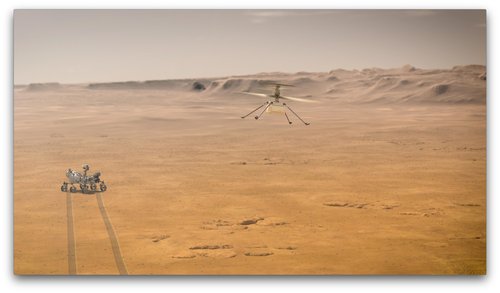
(Artist concept; NASA/JPL-Caltech)
The helicoptor is built with off the shelf parts, open source software and runs on a Linux OS. Details here:
Mars Helicopter
To infinity and beyond: Linux and open-source goes to Mars
Read more...
Older posts..