Repurpose Old Cellphones as Home Security Cameras
Posted on Feb 25, 2023 by kingbeowulf
Instead of buying expensive security cameras or USB webcams, older cell phones (iOS and Android) can be repurposed as internet (IP) cameras via WIFI. SIM card not required. In this post, I'll describe a two camera security configuration with ZoneMinder video surveillance software system.
Wi-Fi network IP Camera software
For each phone, you'll need to install software to stream the camera video in format accessible to web browsers (Firefox, etc). For my cameras I chose:
These apps will allow you to stream video inside your WiFi network without internet access via http access. There are others; choose wisely.
Configure Wifi Router
I recommend setting the phones for a fixed IP address so that the same IP is assigned should the phone restart. One way (recommended), is to set your router to provide static leases and block traffic to the internet (WAN). In the iOS and Android settings, under network, look up the MAC address of your phone.
NOTE: Some Android configurations set up a random MAC address. You'll need to turn this off and use the actual hardware address.
My Wifi router utilizes OpenWrt firmware. Others are similar. To set the static lease and profide a fixed IP address when the phone connects to Wifi:
Network -> DHCP and DNS -> Static Leases -> Add
Enter in the camera hostname, MAC address and IP address to use. Enter the values in the --custom-- field. The values below are examples. You will need to select an IP address that doesn't conflict with any other devices on your network.
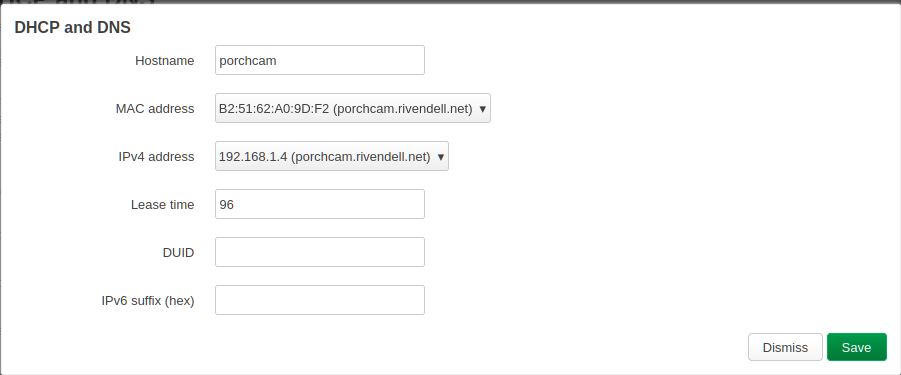
Save and repeat for the second camera. Finally, click Save and Apply.
Next step is to block each camera from the internet. We can do that with a firewall rule:
Network -> Firewall -> Traffic Rules -> General Settings:
- Name: Block-Porcncam
- Protocol: Any
- Source zone: lan
- Destination zone: wan
- Action: reject
-> Advanced Settings (same as static lease):
- Source MAC address: B2:51:62:A0:8D:F2
- Source IP address: 192.168.1.4
Save and then Save and Apply.
HTTP Stream Test
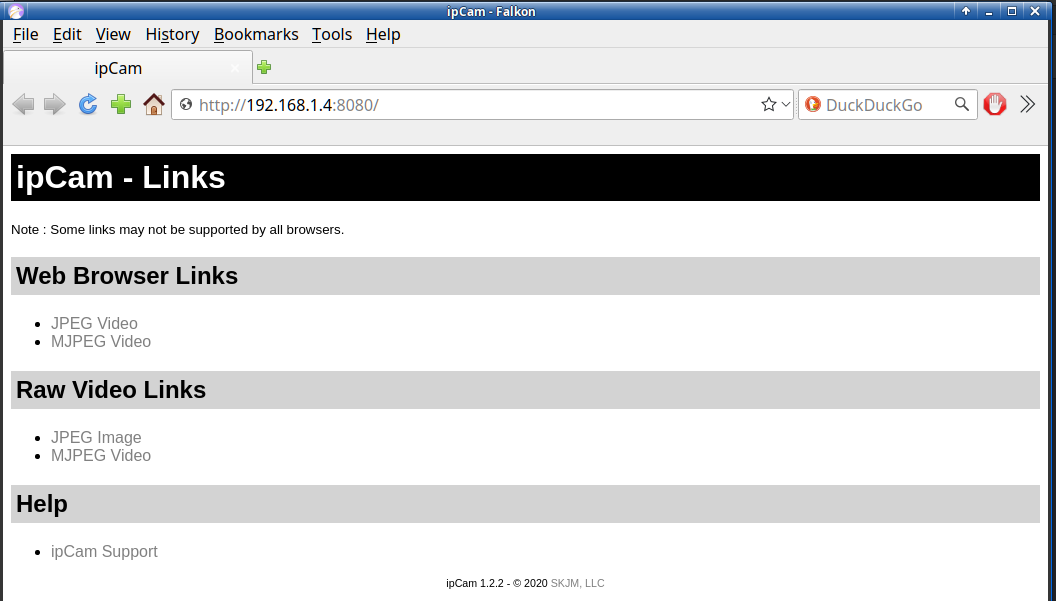
The camera apps have various settings; configre as needed. The will display the HTTP URL to use. I set up each for large image, 15 fps and to user port 8080. For ipCAM, to test and get the URL for ZoneMinder, open a browser and enter
http://192.168.1.4:8080
The above IP and port are examples. Click the MJPEG Video Browser link to test. For ZoneMinder use the MJPEG Video under Raw Video Links. You can also test with ffplay (part of ffmpeg package).
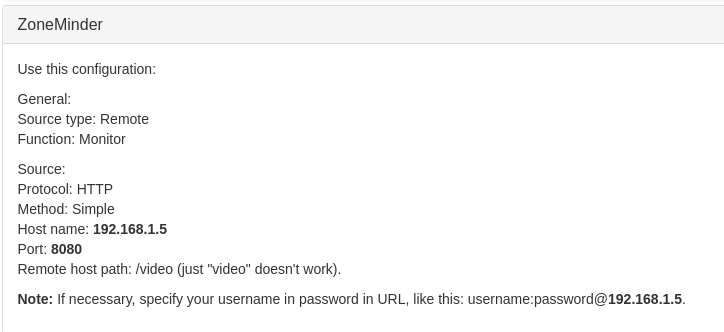
IP Webcam's page has a bunch of fancy features to play test. For our requirements, go to
Other Viewing Methods -> ZoneMinder
Configure ZoneMinder
ZoneMinder is a very full-featured, open source, state-of-the-art video surveillance software system available for Linux and Windows. Consult your OS for installarion procedures. For Slackware, download the buildscripts from Slackbuilds.org to create the install packages.
The ZoneMinder User Guide Documention is extensive. Create a new monitor for each camera and add the source URL for each. To start, the defaults are fine. Key settings:
- Source Type: ffmpeg
- Method: TCP
- Video Writer: H264 Passthrough
IP Web Cam has a handy ZoneMinder preset that sets up sane defaults.
ZoneMinder has a plethora of options. Configuration is left as an excercise for the reader. Play around and see what works best for you. You can also set up ZoneMinder to securely stream to their zmNinja phone app for remote monitoring on the go.
caveat - noun - /ˈkæv·iˌæt, ˈkɑ·viˌɑt/
A warning, for example about the use or effectiveness of something.
Cellphones are notoriously fickle pocket computers that are not very robust given their typical design of planned obsolescence.
- Short battery life requiring mounting near, or routing a cable from, a wall electrical socket.
- No night vision.
- Random reboots.
- Random crashes.
- Overheating (see 2. and 3. above).
- Pets, especially cats, love to unplug and/or chew on power cords.
So far, I've had the iPhone 6s and Nokia 7.1 run continuously for 2-3 days. YMMV.
Have fun and enjoy!
- Related Topics:
- slackware
- linux
- OpenWrt
- ZoneMinder
- IP Camera
Contact:
- kingbeowulf@linuxgalaxy.org
- mumble.linuxgalaxy.org:64738
- Libera.chat IRC
- ##slackware, #slackbuilds, #linuxgalaxy
Screamin' and a-streamin' !
- https://twitch.tv/kngbwlf
- https://www.youtube.com/@mylinuxgalaxy
Advertisement
Tired of Steam, Epic and other rip-off game "stores"? Check out Humble Bundle for your digital download needs! A portion of your hard-earned gaming cash goes to charity.
King Beowulf's Humble Bundle Referral CodeCitizen Science!

